

Description
Download VidShot Capturer – Free Screen Recording & Video Capture Tool for Windows
VidShot Capturer is a lightweight, free screen recording software designed for Windows users who need a reliable tool to capture their screen activity. Developed by Geovid, this compact application offers straightforward video capture without the clutter of unnecessary features. Ideal for educators, content creators, and professionals who want to record tutorials, presentations, or gameplay, VidShot Capturer delivers smooth performance even on older systems. With a minimal footprint and a simple interface, it’s a great choice for users seeking an efficient way to record screen content without draining system resources. The software has been available since 2011 and has gained steady popularity, particularly in the Republic of Korea, Poland, and Finland. Despite its age, VidShot Capturer continues to serve users who value simplicity and speed over advanced editing tools.
Simple & Efficient Screen Recording with VidShot Capturer
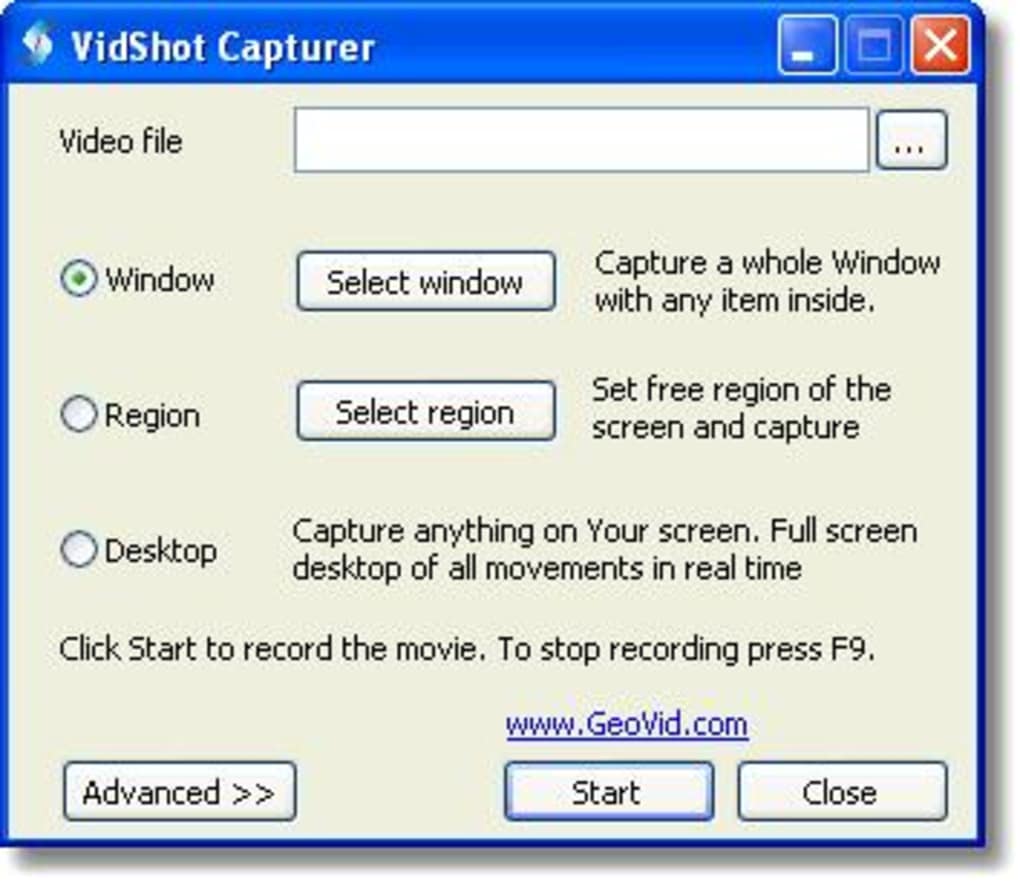
VidShot Capturer stands out in the crowded field of screen capture tools due to its minimalist design and ease of use. Unlike many modern screen recorders that come with complex menus, multiple settings, and bloated interfaces, VidShot Capturer keeps things refreshingly simple. Upon launching the app, users are greeted with a clean interface featuring just a few essential controls: Start, Stop, and Settings. This streamlined approach makes it accessible even to beginners who may be unfamiliar with screen recording software.
Recording your screen is as easy as clicking the “Start” button. The software captures everything happening on your monitor, including mouse movements, window transitions, and audio from your system (if configured). It supports full-screen recording or allows you to select a specific region of your screen, giving you flexibility depending on your needs. The output format is typically AVI, which is widely supported across media players and editing tools. While it lacks advanced features like real-time annotations or in-app editing, this limitation is intentional—VidShot Capturer focuses on one thing: reliable, fast screen capture.
One of the most appealing aspects of this tool is its low system resource usage. It runs efficiently on older Windows systems, including Windows 98 and earlier versions, making it a rare gem for users with legacy hardware. This makes it ideal for educational institutions or small businesses still using outdated machines. The software is also completely free, with no ads, in-app purchases, or watermarks on recordings. For users who prioritize performance and simplicity over flashy features, VidShot Capturer remains a solid choice.
Compatibility & Installation: Getting Started with VidShot Capturer
Installing VidShot Capturer is a breeze, especially for users who value quick setup and minimal hassle. The software is designed to run on older Windows operating systems, including Windows 98, ME, 2000, XP, and even earlier versions. This wide compatibility makes it one of the few screen recording tools still functional on legacy systems that many modern applications can’t support. While it may not be suitable for the latest Windows 10 or 11 users, it’s an excellent option for those maintaining older machines or working in environments with strict software policies.
To get started, download the installer from a trusted source. The file size is remarkably small—typically under 5 MB—making it easy to transfer via USB or download on slow internet connections. Once downloaded, simply run the executable and follow the on-screen prompts. No complex configuration is required. The installation process completes in seconds, and the app is ready to use immediately after launch.
After installation, users can begin recording right away. The interface is intuitive, with minimal settings to adjust. You can choose between full-screen and custom region recording, select audio sources (system audio, microphone, or both), and set the output folder. The software doesn’t require administrator rights to run, which is a plus for users on restricted accounts. It’s also portable—meaning you can run it directly from a USB drive without installing it, adding to its flexibility.
Despite being last updated in 2011, VidShot Capturer remains functional and stable. While it lacks support for modern features like HD recording, webcam overlay, or cloud sharing, its core functionality is rock-solid. For users who don’t need cutting-edge capabilities, this simplicity is a strength. It’s also worth noting that the software is available only in English, which may be a limitation for non-English speakers.
Pros, Cons & Key Features of VidShot Capturer
- Lightweight and fast, ideal for older Windows systems
- Free to download and use with no hidden costs
- Simple, intuitive interface with minimal learning curve
- Supports full-screen and region-based screen recording
- Records system audio and microphone input (configurable)
- Small file size (under 5 MB), easy to distribute
- Portable version available—run without installation
- Stable performance with minimal CPU and RAM usage
Pros
- Extremely lightweight and efficient on older hardware
- Completely free with no ads or watermarks
- Fast installation and instant usability
- Perfect for quick screen recordings without distractions
- Runs on Windows 98 and earlier—rare in modern software
Cons
- Outdated interface and lacks modern features
- Only supports AVI output format (not ideal for sharing)
- No built-in video editing or annotation tools
- Not compatible with Windows 10/11 or newer systems
- Only available in English
Frequently Asked Questions (FAQ)
Final Verdict: A Nostalgic Yet Functional Tool for Screen Capture
While VidShot Capturer may feel outdated by today’s standards, it remains a surprisingly effective tool for users with specific needs. Its lightweight design, minimal system requirements, and zero cost make it a valuable option for those working on older hardware or needing a no-frills recording solution. For educators, trainers, or hobbyists who want to capture screen content quickly without distractions, this software delivers exactly what it promises.
However, if you’re using a modern Windows 10 or 11 system and need advanced features like HD recording, webcam overlay, or video editing, you’ll likely want to consider alternatives like oCam, LightShot, or Snagit. VidShot Capturer is best suited for niche use cases where simplicity and compatibility with legacy systems are more important than modern enhancements.
Still, for the right user, VidShot Capturer is a reliable, secure, and free screen capture tool that continues to hold its ground. If you’re looking for a no-cost, lightweight way to record your screen on older Windows machines, don’t overlook this hidden gem. Download VidShot Capturer today and experience efficient screen recording the old-school way.
Guides & Tutorials for VidShot Capturer
How to install VidShot Capturer
- Click the Preview / Download button above.
- Once redirected, accept the terms and click Install.
- Wait for the VidShot Capturer download to finish on your device.
How to use VidShot Capturer
This software is primarily used for its core features described above. Open the app after installation to explore its capabilities.
User Reviews for VidShot Capturer 0
No reviews found





